
Making your own Jeopardy game used to mean spending hours in PowerPoint, manually formatting category boxes, dollar amounts, and question reveals. Not anymore. A handful of free tools now let you build a fully functional, professional-looking Jeopardy game in under ten minutes — no design skills required, no PowerPoint, no downloads.
This guide covers the best free Jeopardy game makers available right now, how to use each one, tips for writing questions that actually work, and how to run the perfect game whether you’re a teacher reviewing content, a student hosting a game night, or a party host who wants something more interesting than trivia cards.
What Is a Jeopardy Game Maker?
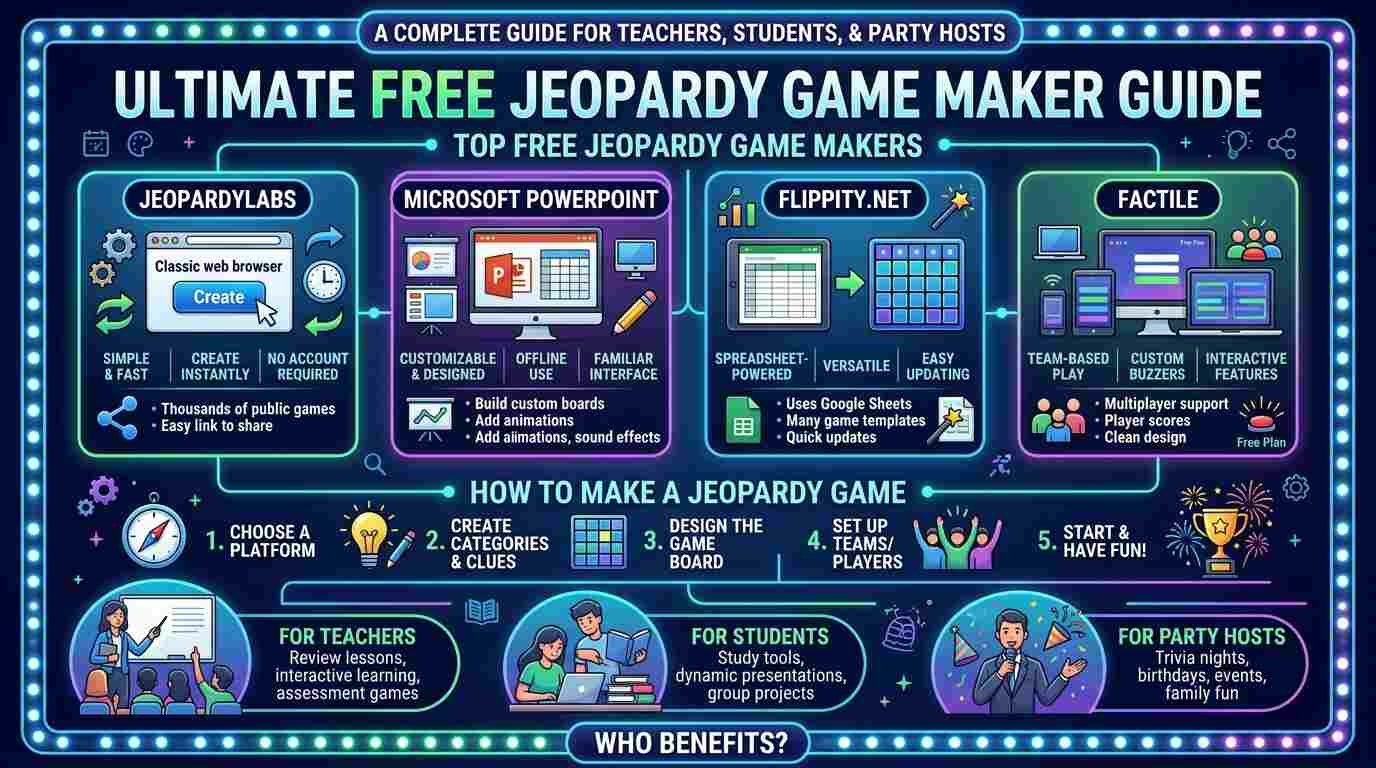
A Jeopardy game maker is a free online tool that lets you build a custom Jeopardy-style game board. You enter your own categories, questions, and answers. The tool handles all the formatting — the grid, the dollar amounts, the question reveal animation, and the scoring.
The result looks and plays exactly like the TV show. You project it on a screen, players call out dollar amounts, you click to reveal the answer, players buzz in with their question, and you track scores on the side.
The difference between a good Jeopardy maker and a bad one comes down to three things: how easy it is to build the board, how smooth the presentation looks during play, and whether it’s genuinely free or hides features behind a paywall.
Best Free Jeopardy Game Makers — Reviewed
1. JeopardyLabs — Best Overall
Website: jeopardylabs.com Cost: Free (paid plan removes ads during play) Best for: Teachers, classroom use, quick setup
JeopardyLabs is the most widely used free Jeopardy maker online — and for good reason. The interface is clean and minimal. You click a cell, type your question and answer, and move on. No account required to build a basic game. The finished board is shareable via a unique link you can send to anyone or project directly.
How to use it:
- Go to jeopardylabs.com
- Click “Create a Game”
- Enter your board title
- Click each cell to add a category name, then click each dollar amount to add your question and answer
- Save — you get a unique link immediately
- Open the link on a projector or shared screen to play
- What it does well: The presentation mode is smooth. Questions pop up clearly when clicked, and the board tracks which questions have been used by dimming spent cells. Scores can be added manually on a separate scoreboard that runs alongside the board.
- The catch: The free version displays ads during gameplay — visible to everyone watching the projected screen. This is a real drawback in classroom settings. The paid plan removes ads for a small monthly fee. For casual home use, the ads are manageable.
Verdict: Best starting point for anyone who wants to build a Jeopardy game fast. The link-sharing makes it ideal for remote play over video call too.
2. Factile — Best for Teachers
Website: playfactile.com Cost: Free tier available, paid plans from around $5/month Best for: Teachers who want student accounts, tracking, and classroom management features
Factile was built specifically for classroom use and it shows. Beyond the basic Jeopardy board, it supports multiple game formats — standard Jeopardy, team play, individual student devices, and a “quiz show” mode where students answer on their own phones simultaneously. It also tracks individual student scores across sessions.
How to use it:
- Create a free account at playfactile.com
- Click “Create New Game”
- Enter categories and questions using the grid interface
- Choose your game mode — standard board, team mode, or individual device mode
- Share the game code with students or project the board directly
- What it does well: The multi-device mode is genuinely useful. Students answer questions on their own phones rather than buzzing in verbally — which means everyone participates simultaneously rather than one fast reactor dominating every question. Score tracking across multiple sessions is a feature no other free tool matches.
- The catch: The free tier limits you to a small number of saved games. Teachers who want to build a full library of Jeopardy boards across different subjects and units will hit the limit quickly and need the paid plan.
- Verdict: The best option for regular classroom use where student engagement tracking matters. Overkill for one-time use — use JeopardyLabs instead if you only need one game.
3. Jeopardy Rock — Best for Party Use
Website: jeopardyrock.com Cost: Completely free Best for: Party hosts, casual game nights, no-account quick play
Jeopardy Rock strips everything back to the essential experience. No account. No ads during play. No paid tier. You build the board, get a link, play the game. That’s it.
The interface is slightly less polished than JeopardyLabs but the gameplay experience is cleaner — no ads interrupting the reveal moment is a genuine advantage for party settings where the screen is the center of attention.
How to use it:
- Go to jeopardyrock.com
- Click to create a new board
- Enter your categories and questions in the grid
- Save and share your link
- Play immediately — no account needed
- What it does well: Zero friction from start to play. The ad-free presentation mode makes it the best free option for projecting in a living room or party setting where ads breaking the flow would kill the atmosphere.
- The catch: Fewer features than JeopardyLabs or Factile. No built-in scoreboard, no student tracking, no multi-device mode. You manage scores manually. For casual use this is fine — for classroom use you want more.
- Verdict: The best choice for game nights, parties, and any situation where you need a clean, ad-free presentation without paying anything.
4. Google Slides Jeopardy Template — Best for Full Customization
Website: Available free via Google Slides template gallery or community templates Cost: Completely free Best for: Users who want complete design control and offline capability
If you want total control over how your Jeopardy board looks — custom colors, images, fonts, your school’s branding — a Google Slides template is the most flexible option. Pre-built Jeopardy templates are available free from multiple sources and work entirely within Google Slides, which most students and teachers already have access to.
How to use it:
- Search “Jeopardy Google Slides template free” and download or copy any of the top results to your Google Drive
- Edit the category names, dollar amounts, and questions directly in the slides
- Use the presentation mode in Google Slides to run the game — click through slides to reveal questions
- Share via Google Drive link or present from any device with a Google account
- What it does well: Unlimited customization. You can add images, videos, sound effects, and custom styling that no online Jeopardy maker supports. Works offline once downloaded. Saved permanently in your Google Drive with no account limitations.
- The catch: Much more setup time than dedicated Jeopardy tools. Navigation between slides requires careful hyperlinking to work smoothly — a poorly set up template results in a clunky presentation. Finding a good pre-built template is easy but building your own from scratch takes genuine effort.
- Verdict: Best for users who need complete design control or want to embed images and multimedia into questions. Not recommended for quick builds — use a dedicated tool for speed.
5. Kahoot — Best for Large Groups
Website: kahoot.com Cost: Free tier available, paid plans for advanced features Best for: Large classrooms, school events, assemblies
Kahoot isn’t strictly a Jeopardy maker — it’s a broader quiz platform — but it offers a Jeopardy-style mode and is worth mentioning because of its scale. Kahoot handles hundreds of simultaneous players on individual devices with a single host screen, which no pure Jeopardy tool can match.
For school events, assemblies, or any situation with more than twenty players, Kahoot is the practical choice even if the Jeopardy format isn’t quite as faithful as dedicated tools.
Verdict: Use it when scale matters more than format fidelity. For standard classroom or party Jeopardy, stick with JeopardyLabs or Jeopardy Rock.
Quick Comparison — Which Jeopardy Maker Should You Use?
| Tool | Cost | Ads During Play | Account Needed | Best For |
|---|---|---|---|---|
| JeopardyLabs | Free / Paid | Yes (free) | No | Quick builds, sharing |
| Factile | Free / Paid | No | Yes | Classroom tracking |
| Jeopardy Rock | Free | No | No | Parties, casual play |
| Google Slides | Free | No | Google account | Full customization |
| Kahoot | Free / Paid | No | Yes | Large groups |
How to Make a Jeopardy Game — Step by Step
Regardless of which tool you choose, the process of building a good Jeopardy game follows the same steps. Here’s the complete walkthrough.
Step 1 — Choose Your Categories
A standard Jeopardy board has five or six categories. Each category should have a clear, specific theme that players can identify immediately from the name.
Good category names:
- “World Capitals” — clear, specific
- “Shakespeare Plays” — clear, specific
- “Things in a Kitchen” — clear, specific
- “90s Cartoons” — clear, specific
Weak category names:
- “History” — too broad
- “Random Facts” — gives players no strategy
- “Miscellaneous” — the worst category name in any trivia game
The best Jeopardy categories have a theme tight enough that players can make educated guesses even when they don’t know the exact answer — and surprising enough that the answers feel satisfying rather than obvious.
Step 2 — Write Five Questions Per Category
Each category needs five questions at five different difficulty levels corresponding to the dollar amounts — typically 100, 200, 300, 400, and 500 in standard play.
The difficulty curve matters. The 100-point question should be answerable by nearly everyone. The 500-point question should stump most players at least briefly. A flat difficulty curve where all questions feel the same kills the strategic tension of choosing which dollar amount to attempt.
Step 3 — Write in Jeopardy Format Correctly
This is where most homemade Jeopardy games go wrong. On the actual TV show, the host reads the answer and contestants respond with the question. Most casual games flip this — which is fine as long as you’re consistent.
- TV format: Host reads “This is the largest planet in our solar system.” Player responds “What is Jupiter?”
- Casual format: Host reads the question normally. Player answers normally. This works perfectly well for parties and classrooms — just decide which format you’re using before you start.
If you want authentic Jeopardy format, write your clues as statements rather than questions and train players to respond with “What is…” or “Who is…”
Step 4 — Balance Your Questions Across Skill Levels
For classroom use, balance questions so that strong students don’t dominate every single round. Include at least one question per category that rewards different types of knowledge — cultural knowledge, pop culture, practical skills, memory — alongside the core academic content.
For party use, mix in a few extremely easy questions at the low dollar amounts so everyone gets moments of confidence, and a few extremely hard questions at high dollar amounts so the competitive players have something to fight over.
Step 5 — Add a Daily Double
Most Jeopardy game makers let you designate one or two cells as Daily Doubles. When a player selects a Daily Double, they can wager any amount up to their current total score before hearing the question. This mechanic creates dramatic swings and keeps lower-scoring players in contention.
Place Daily Doubles at medium difficulty — not in the easiest category or the hardest. The strategic tension of wagering only works if the question is genuinely uncertain.
Step 6 — Test Your Board Before Playing
Before your game session, run through your board privately. Click every cell. Verify every answer is correct. Check that your category names display properly and that the difficulty curve feels right. A single incorrect answer on a projected board in front of a class or party group is embarrassing and disrupts the flow.
Jeopardy Question Writing Tips
Writing good Jeopardy questions is a genuine skill. These tips make the difference between a game that runs smoothly and one that sparks arguments every other round.
- Be specific about what you’re looking for. Vague questions produce disputed answers. “Name something cold” has too many valid answers. “What is the coldest recorded temperature on Earth?” has exactly one correct answer.
- Avoid trick questions entirely. Jeopardy is competitive enough without adding gotcha moments. Questions that technically have one answer but are worded to mislead players create frustration rather than fun. Save cleverness for category names, not question wording.
- Write the answer before the question. Decide what answer you want first, then write the question that uniquely leads to that answer. This reverse approach prevents questions that could technically have multiple correct answers.
- Match difficulty to dollar amount precisely. Play test your questions by asking yourself: what percentage of players in my group would know this? 100-point answers should be 90%+. 500-point answers should be under 30%. Calibrate to your specific group — a class of geography students needs harder geography questions than a general party group.
- Keep question length short. Long, complex question text slows the game down and creates confusion when projected on screen. One sentence is ideal. Two sentences maximum. If you need three sentences to ask the question, split it into two questions.
- Avoid ambiguous answers. “Name a country in Europe” is terrible Jeopardy. “This is the only country in Europe that is also a city” has exactly one answer — Vatican City. Specificity prevents arguments.
How to Run a Jeopardy Game — Host Tips
Building the board is half the job. Running it well is the other half. Here’s how to be a great Jeopardy host.
- Project big and clearly. The board needs to be visible to everyone simultaneously. A laptop screen is too small for more than four players. Use a projector, a TV, or a large monitor and position it where every player can read the smallest text without squinting.
- Establish the rules before you start. Before the first question, clearly state: How do players buzz in? What happens on wrong answers — do they lose points? How long do players have to answer? What counts as a correct answer for questions with multiple valid phrasings? Sorting these out in advance prevents every dispute the game would otherwise generate.
- Use a physical buzzer system if possible. Verbal “buzz” sounds work but create disputes about who buzzed first. Inexpensive physical buzzers — available online for under fifteen dollars for a set of four — eliminate every first-to-buzz argument instantly. For regular classroom use they’re worth the investment.
- Keep score visibly. Write scores on a whiteboard, update a simple spreadsheet on a second screen, or use the built-in scoreboard that some tools provide. Visible scores create tension and investment. Hidden scores produce a flat energy.
- Move quickly between questions. The rhythm of Jeopardy is part of what makes it fun. Don’t let gaps between questions stretch longer than thirty seconds. Keep the energy up by moving decisively from one question to the next.
- Be a decisive judge. When a borderline answer comes up — close but not exact — make a ruling immediately and move on. Deliberating for two minutes over whether “The Big Apple” counts for “New York” drains energy from the whole room. Establish your judging standard before the game and apply it consistently.
- Build in a halftime break for large games. If you’re running a full thirty-question board with six players or more, a short break halfway through keeps energy levels from dropping in the final rounds. Two minutes is enough.
Jeopardy Game Ideas — Ready-to-Use Category Sets
Here are complete category sets you can use immediately. Just add your own questions.
For Classroom Review — General Academic
- World Geography
- Famous Scientists
- Literary Characters
- Math Vocabulary
- Historical Events
- Vocabulary Challenge
For Middle School
- Disney Movies
- Animal Kingdom
- US States and Capitals
- Famous Inventions
- School Subjects
- Sports Rules
For High School
- Current Events
- Classic Literature
- World History
- Pop Culture
- Science Facts
- Famous Quotes
For a Gaming Party
- Video Game Characters
- Gaming History
- Famous Game Titles
- Gaming Slang
- Console Wars
- Speedrunning Facts
For a General Party
- 90s Nostalgia
- Food and Drink
- Movies and TV
- Sports Legends
- Music Trivia
- Pot Luck
For Family Game Night
- Animals and Nature
- Famous Firsts
- Things in the Kitchen
- Holidays Around the World
- Children’s Books
- Funny Riddles
Jeopardy Variations to Try
Once you’ve run a standard game, these variations keep things fresh for groups that play regularly.
- Team Jeopardy — Players form teams of two or three rather than playing individually. Teams confer quietly before buzzing in. Reduces the advantage of one dominant player and encourages collaboration. Best for classroom settings where participation equity matters.
- Reverse Jeopardy — Players see the answer first and must write the question privately rather than buzzing in verbally. All written questions are revealed simultaneously. The most creative or accurate question wins the points. Rewards thoughtful players over fast reactors.
- Speed Jeopardy — No buzzer system. First player to shout their answer gets credit — or loses points for wrong answers. Much louder and more chaotic than standard play. Best for small groups of four or fewer where voice identification is easy.
- Elimination Jeopardy — Any player who hits zero points or below is eliminated from the game. Remaining players continue. The last player with positive points wins. Creates genuine risk in wagering decisions and keeps stakes high throughout.
- Custom Wager Jeopardy — All questions are Daily Doubles. Before every question, every player silently writes their wager on a piece of paper. All wagers revealed simultaneously, then the question is asked. Much more strategic than standard play — every question becomes a calculated risk.
- Picture Round Jeopardy — Some categories use images instead of text clues. Players identify what’s shown in the image. Works best with the Google Slides format where embedding images is straightforward.
Play Free Games at SyceGamesHack
Looking for more free games to play between Jeopardy sessions? SyceGamesHack has 160+ free browser games — puzzle games, word games, party games, and multiplayer games — all completely free, no download required, no ads, and fully accessible on school Chromebooks and any device.
Whether you’re a teacher looking for classroom game options or a student wanting something to play between study sessions, SyceGamesHack has you covered. Open the link and you’re playing within seconds.
Related Articles You’ll Love
- How to Play the Chameleon Game — social deduction word game perfect for classrooms and parties
- Imposter Game Generator — free word lists and roles for instant imposter game play
- How to Play the Hashtag Game — creative prompt party game that works for any group size
- Nerdle Game Guide — the daily math puzzle game that students and teachers both love
- How to Play Letter Boxed — the NYT daily word chain puzzle with fresh content every day
- How to Play MASH — the classic student favourite that needs zero setup
FAQs
Q: What is the best free Jeopardy game maker?
JeopardyLabs is the best overall free Jeopardy game maker for most users — fast to build, shareable via link, and no account required. For classroom use with student tracking, Factile is better. For parties where ads during play would be disruptive, Jeopardy Rock is the best completely free and ad-free option.
Q: Do I need to create an account to make a Jeopardy game?
Not always. JeopardyLabs and Jeopardy Rock both allow you to create and play a Jeopardy game without any account. You get a shareable link immediately. Factile and Kahoot require accounts — but accounts are free to create and unlock additional features like saved game libraries and student tracking.
Q: How long does it take to make a Jeopardy game?
With a dedicated tool like JeopardyLabs or Jeopardy Rock, a standard five-category thirty-question board takes about 15 to 20 minutes to build — assuming you already know your questions and answers. If you’re writing questions from scratch at the same time, budget 30 to 45 minutes for a well-balanced board.
Q: Can I save my Jeopardy game and use it again?
Yes on most platforms. JeopardyLabs gives you a permanent link to your saved game that you can reuse anytime. Factile saves games to your account library. Google Slides templates are saved permanently in your Google Drive. Jeopardy Rock saves games via link as well. None of the major free tools delete your game without warning.
Q: Can I play Jeopardy online with remote players?
Yes — all of the tools reviewed here work for remote play. Share your board link in a video call, screen-share the board through Zoom, Teams, or Google Meet, and play with remote participants using a verbal buzzer system or a hand-raise feature in your video call tool. JeopardyLabs and Jeopardy Rock are both designed to be shareable links which makes remote play seamless.
Q: How many players can play Jeopardy at once?
Standard Jeopardy works best with three to six individual players or two to four teams. Beyond six individual players, buzzer disputes become hard to manage and turns feel too infrequent to maintain engagement. For larger groups up to thirty students use a team format or switch to Kahoot which handles large simultaneous groups better than a traditional Jeopardy board.
Q: Can I add images or videos to my Jeopardy game?
Google Slides templates support images and video natively. Factile supports image-based questions on paid plans. JeopardyLabs and Jeopardy Rock support text only on their free tiers. If multimedia questions are important to your game design picture rounds, audio clips, video clues Google Slides is the most capable free option.
Q: Is it legal to use Jeopardy format for classroom or party games?
Yes. The Jeopardy format — a grid of categories and dollar amounts is a game structure rather than protectable intellectual property in most jurisdictions. Teachers and students have made custom Jeopardy games for educational use for decades without any legal issue. The name “Jeopardy!” and the specific TV show format are trademarked, which is why none of these tools can use the official name but the gameplay structure itself is freely usable.
Q: What do I do if players dispute an answer?
Establish your judging policy before the game starts. Common approaches are: host’s decision is final with no appeal, majority vote from non-competing observers decides borderline cases, or a rule that answers must match the expected answer exactly to count. Decide one and commit to it. Mid-game policy changes create more disputes than they resolve.
Q: Can students make their own Jeopardy games as a class project?
Absolutely and this is one of the best uses of these tools. Having students create Jeopardy boards as a review activity requires them to deeply understand the content well enough to write questions about it. The creation process is itself a learning exercise. JeopardyLabs is the best tool for this use case because it requires no account and produces a shareable link students can submit directly to the teacher.